
项目Deer-flow的学习(缓慢记录中)
Flow

项目地址:https://github.com/bytedance/deer-flow

刷到一个agent项目推荐,其中符合harness agent概念,涉及沙箱、web search、subagent这些要素,于是希望深入源码探索

一般学习步骤直接用code agent给我拆解项目结构,然后再去“抄”一遍具体的代码。最近意识到自己的学习摄入率降低,没有笔记输出,坏习惯出现,为了及时矫正,开了一个新博客做记录,还不确定会写到什么程度,也许只是一些很浅的内容,但是有记录总比没有好。

我agent基础不是很扎实,但是想把这个项目了解深一些,所以没办法一口气全部写完,断断续续记录中。

带着问题学习

其实这个项目里面有一个CLAUDE.md文件把这个项目结构解释的很清楚,以下是我对学习一个agent项目一开始会想到的问题:

  • subagent和主agent是用到什么胶水粘合起来的
  • 驾驭工程的部分体现在哪里
  • 沙箱部分是怎么实现,接入的
  • 项目中对于一些安全隐患怎么管控的
  • 整体项目prompt有什么引导思路
  • skill,tool这些手脚和思想是怎么和“大脑”结合的
  • memory是怎么控制的
  • 。。。

这些问题只是一些浅薄的认知,如果要说带着什么问题思考,直接让AI给列一个清单是我想到最完善的办法

harness agent

一边看代码一边思考,回过头发现自己对于这个概念还没有一个很清晰明确的认知,现在学习新东西真的很浮躁。。互联网刷到一个新名词就觉得自己会了,并且阅读文章容易没有耐心,这样不行。这里描述一下这个驾驭工程究竟是什么:

Agent = Model(马)+ Harness(马具)

触发 Harness 诞生的痛点

  • 长期运行:Agent 需要运行 3 小时而不是 3 分钟,如何保持状态?
  • 工具风险:Agent 调用 API 修改数据库、发邮件、改代码,如何防误操作?
  • 不可中断:模型陷入循环或偏离目标时,如何强制停止或回退?
  • 审计需求:企业需要知道 AI 每一步做了什么,为什么这样做。

我理解现在基模智力已经到了一定程度,我们想要让agent去实现更复杂,更有上下文的任务,在过往的实践中如果不给Agent加上合适的“马具”,那可控性会降低很多,往往烧了很多token最后也没有实现想要的结果

而deerflow这个项目有完整的sandbox、skill、mcp、subagent、memory等机制,这些就是马具了,并且他是一个Agent“底座”的定位,各部分都已经定义好,交互有完善的机制,我可以不改变整个框架,加上一些自定义的prompt,tool,subagent,去让这个Agent成为某个领域的专家

config配置

其实这个项目涉及到什么组件(暂且这么叫)从config目录就能看的很清楚,每个可配置项(agent、tool、memory、skills、sandbox等)都有单独列出来,这个config目录主要是定义每个配置类,比如TitleConfig,然后就有get_title_config,set_title_config之类的方法
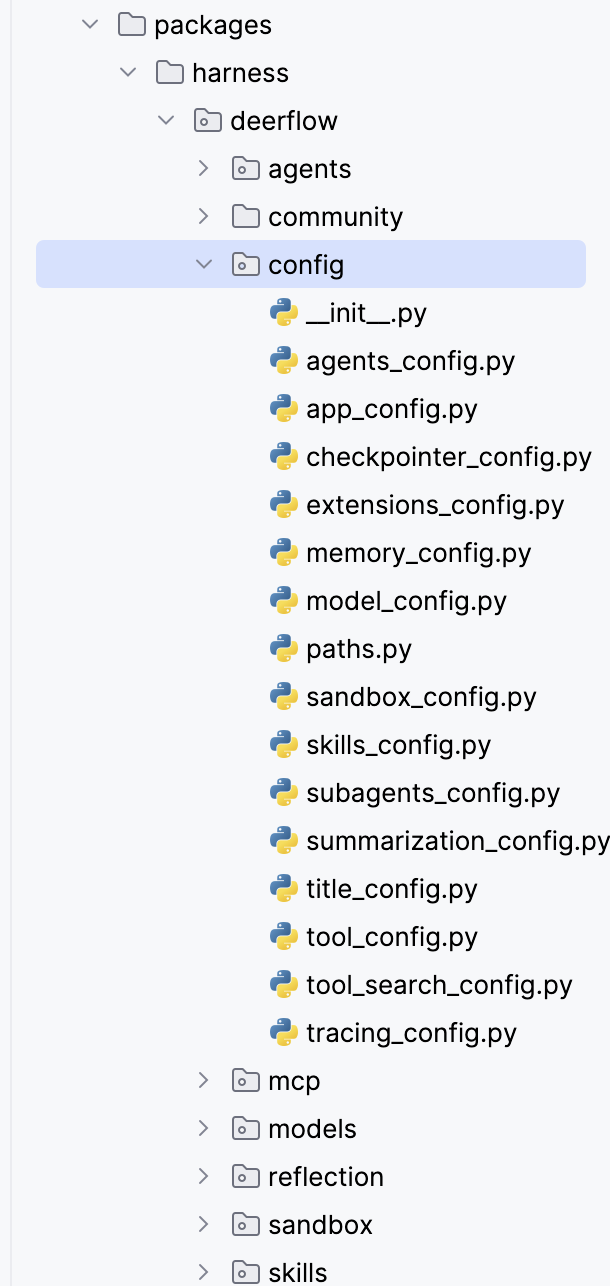
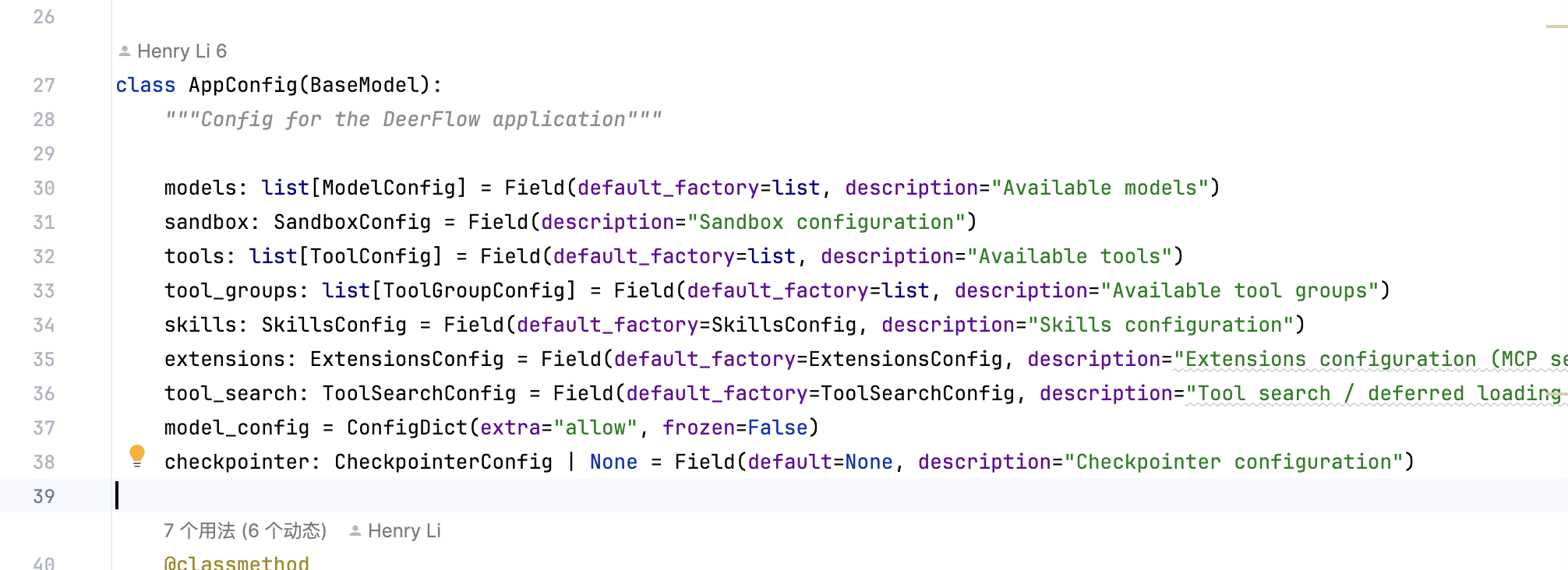
最后汇总是在app_config这里,后面创建modelinstance的时候用这个即可
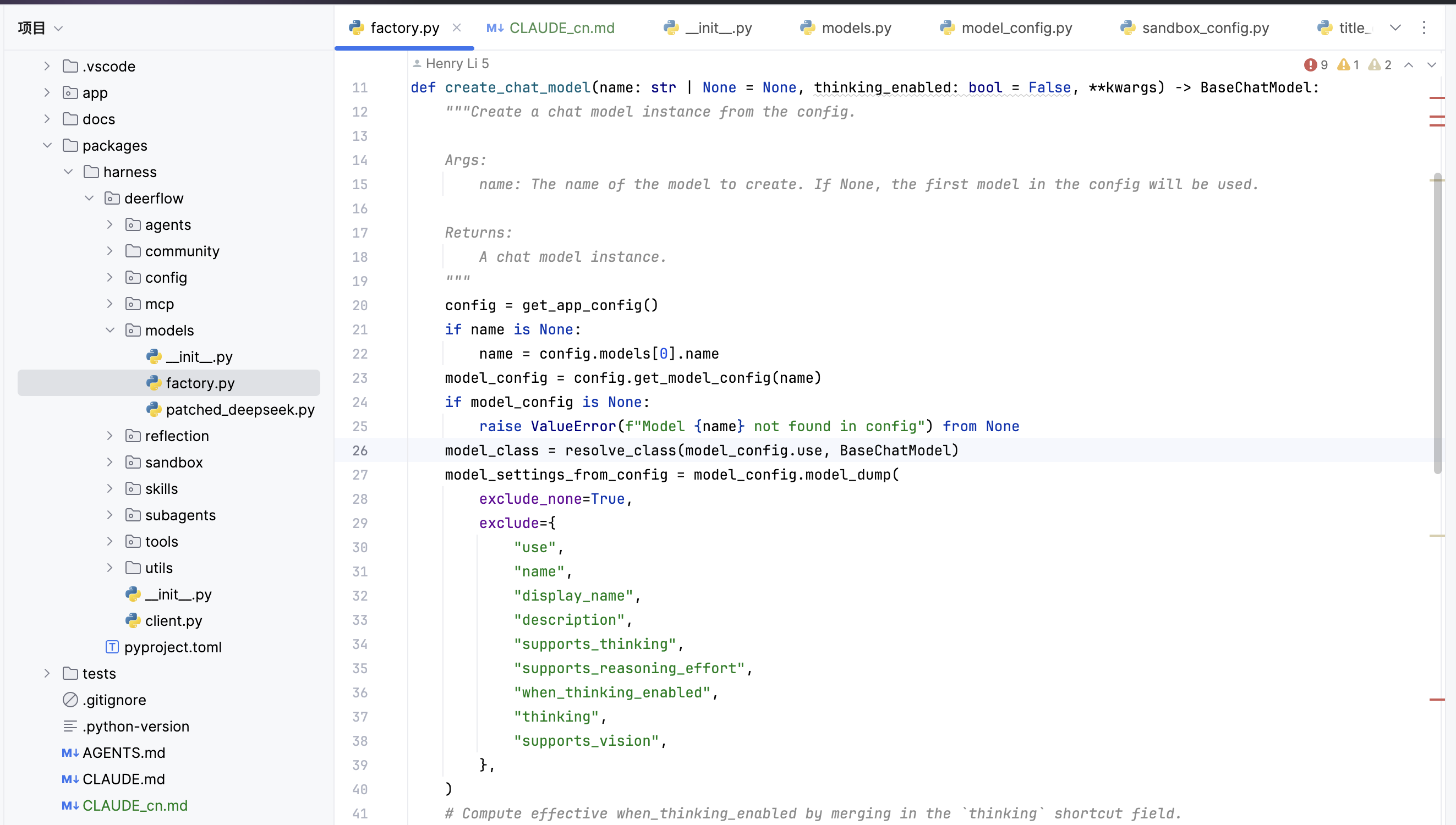
创建model instance

代码在这里,特点是config驱动,并且对于不同的厂商的thinking模式有做兼容,除此之外,也指出tracing模式的兼容
Sandbox

这个项目提供了两张沙箱选择,LocalSandbox和AioSandbox,AioSandbox本身是一个项目了

  • LocalSandboxProvider - 单例本地文件系统执行,带路径映射在本地
  • AioSandboxProviderpackages/harness/deerflow/community/) - 基于 Docker 的隔离执行,使用这个的时候会起一个容器服务,因为不在本地真实环境,还会有backend的调用
1
2
3
4
5
6
7
8
9
➜  aio_sandbox git:(main) ✗ tree .
.
├── __init__.py
├── aio_sandbox.py 接口实现
├── aio_sandbox_provider.py provider管理生命周期
├── backend.py
├── local_backend.py
├── remote_backend.py
└── sandbox_info.py

无论是选择哪一种,都有一样的结构,除了核心功能的实现,还有一个provider管理生命周期

以localsandbox为例,核心功能实现主要是实现命令执行、ls、读文件、写文件等基础功能,provide里面主要是通过acquire、get、release管理一个sandbox的生命周期

然后读sandbox部分相关的代码,会发现sandbox_idthread_id这两个变量,工具里拿沙箱时,是用 thread_id 去 provider.acquire(thread_id),返回的才是 sandbox_id,并写进 state[“sandbox”]。

Localsandbox采用的是路径映射方法

1
2
3
4
5
6
7
🔍 路径映射规则
虚拟路径 (DeerFlow 中) 实际物理路径
━━━━━━━━━━━━━━━━━━━━━━━━━━━━━━━━━━━━━━━━━━━━━━━━━━━━━━━━━━━━━━━━━━━━━━━━━━━━━━━━━━━━━━━━
/mnt/user-data/workspace backend/.deer-flow/threads/{thread_id}/user-data/workspace/
/mnt/user-data/uploads backend/.deer-flow/threads/{thread_id}/user-data/uploads/
/mnt/user-data/outputs backend/.deer-flow/threads/{thread_id}/user-data/outputs/
/mnt/skills skills/ (项目根目录)

根据不同的thread_id隔离每次的工作区

在LocalSandbox,sandbox_id固定为local,按thread_id区分的是不同的thread_data路径

在AioSandbox,对有 thread_id 的请求:用 thread_id 算出一个确定性的 sandbox_id(provider实现)

在AioSandbox里面也实现了双层并发控制:threading.Lock 保护 dict;fcntl.flock 文件锁防 多进程 抢建,还有warm pool机制,释放后不会立刻关闭容器,不用每次用sandbox都要启动一次container,使用对于一个sandbox,有release后放到warmpool等待后续在此调用的方法,也可以彻底destroy,会有一个idle_check去检查一个在warm pool的容器是否空闲太长时间,如果是,再停止容器,除此之外,容器数量超过上限也会停止一些容器

skills

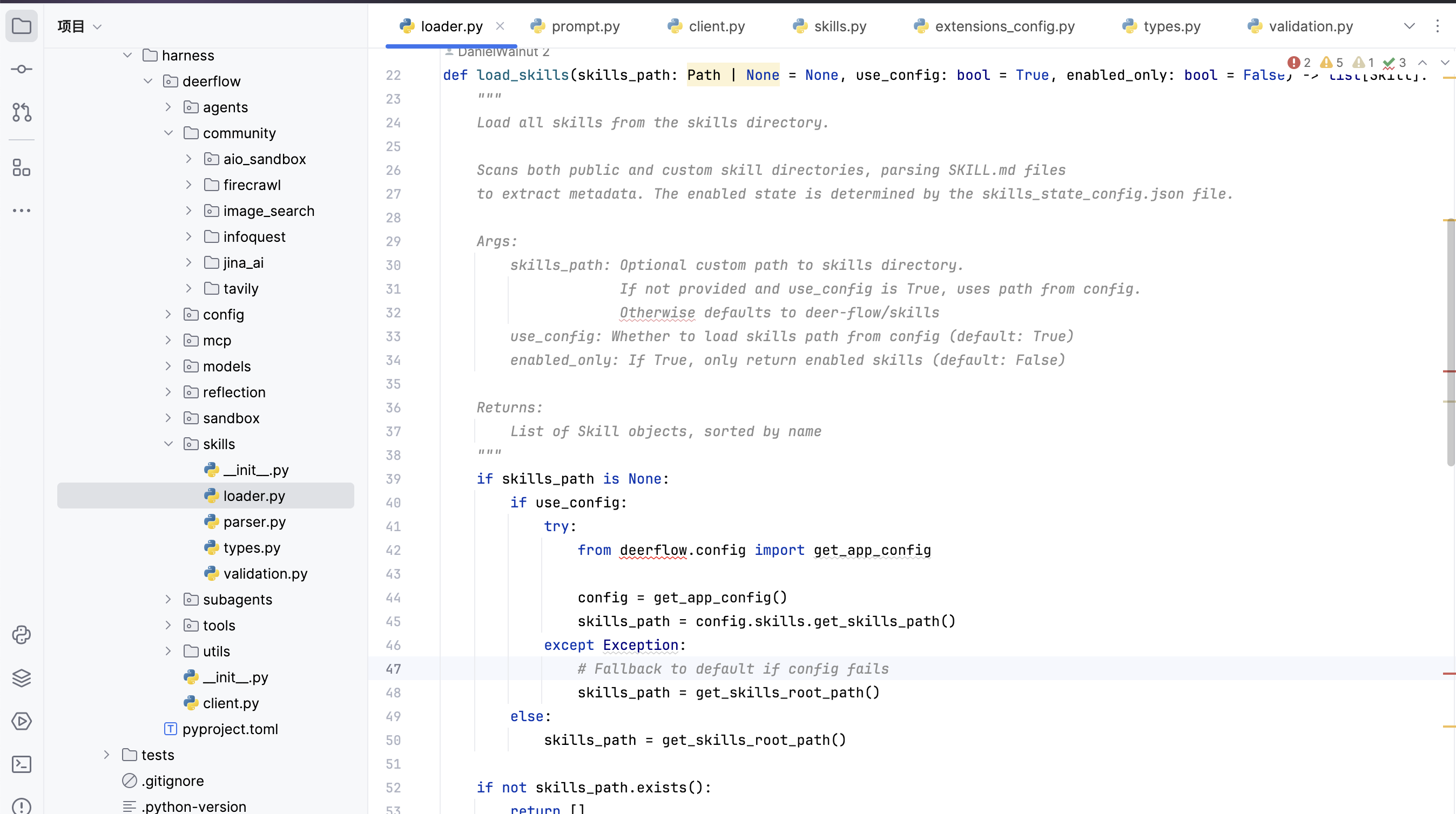
看到skill解析这里,可以看到经过一系列的读取,parser处理,返回的是如下的数据结构
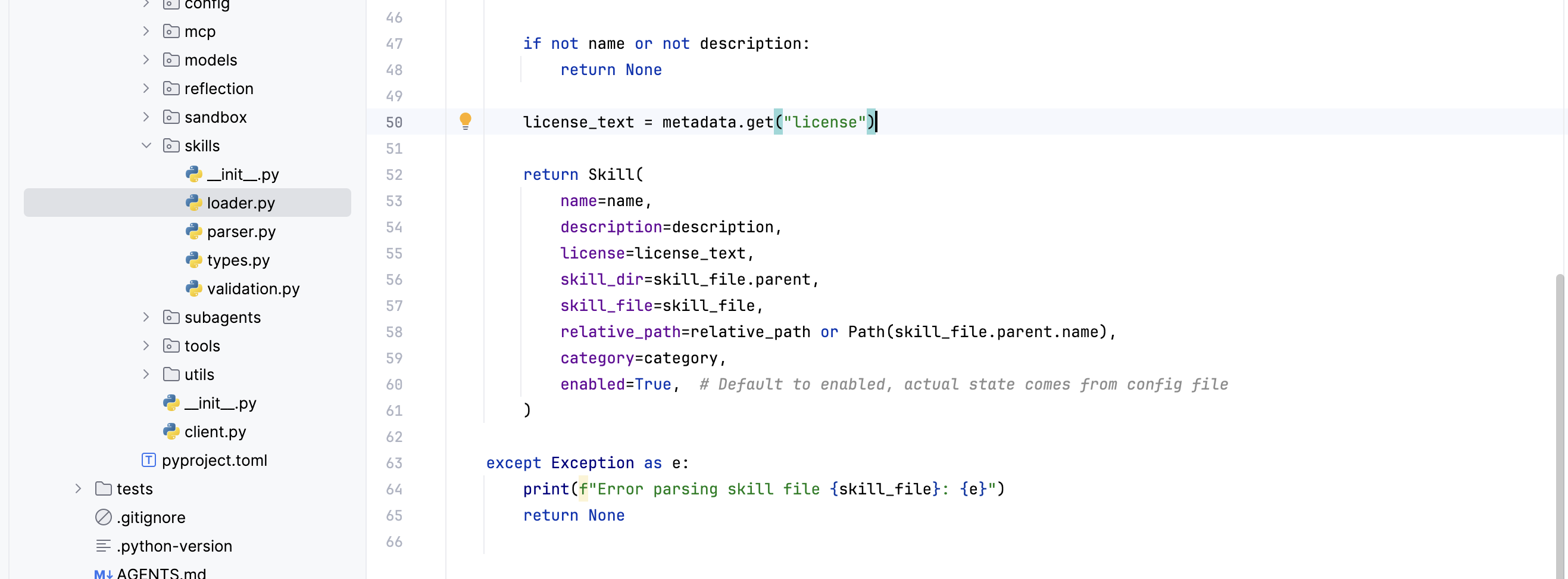
整体skill的加载读下来是好理解的,后面agent运行过程中skill的加载就是调用一个load_skills()方法
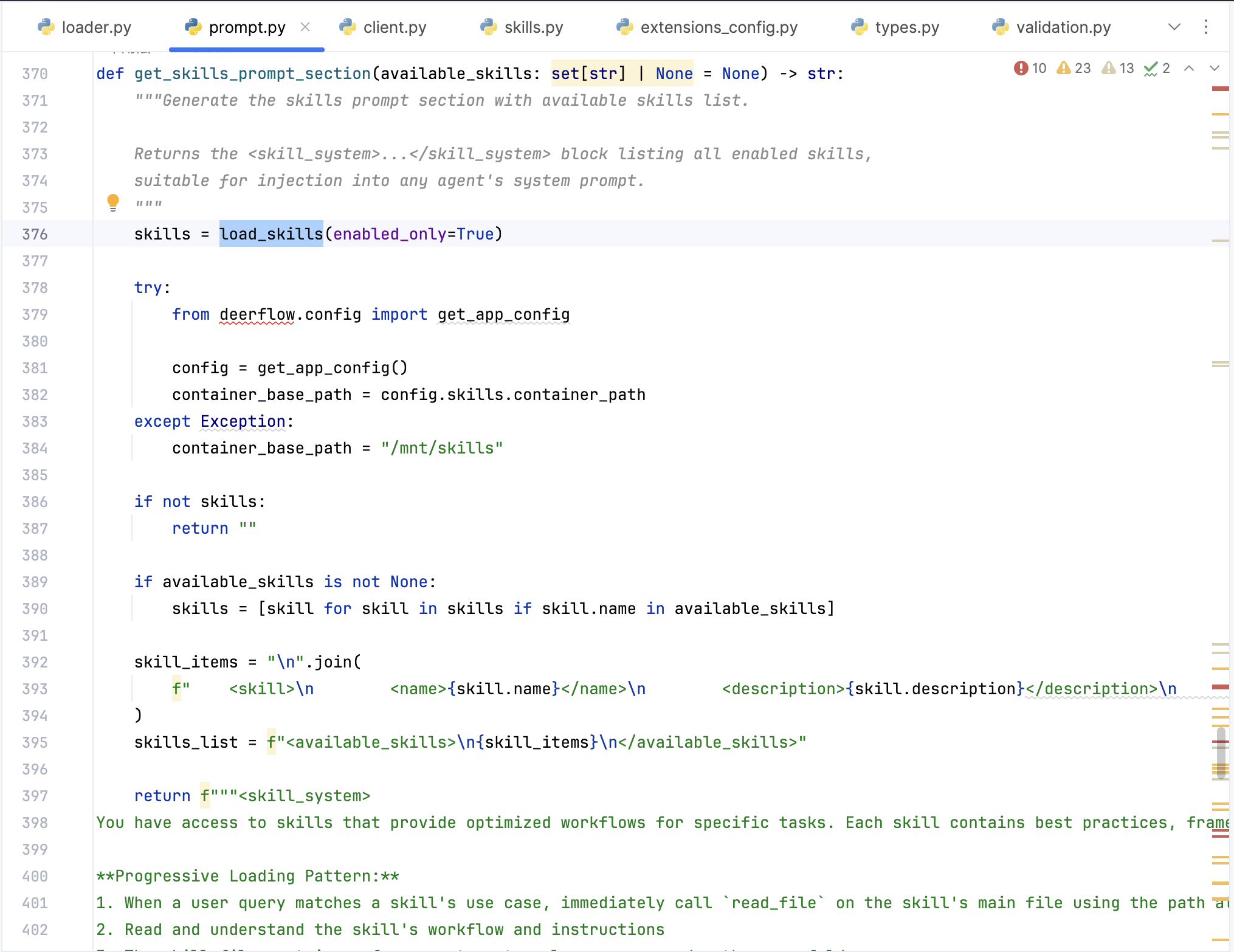
具体的应用比如在提示词构造的时候先调用load_skills读取目前有的skill信息,再format写入到整体prompt里面告知大脑当前有什么skill
MCP

client.py — 把扩展配置变成 MCP 客户端参数

tools.py — 真正拉起 MCP 并导出 LangChain 工具,提供get_mcp_tools()方法后面被调用获取mcp里面的tool

oauth.py — HTTP/SSE 上的 OAuth:拿 token、缓存、刷新、注入,是比较灵活的

cache.py — 进程内缓存 MCP 工具列表 + 配置变更失效,这个项目引入了chache机制,避免重复加载远程mcp tool

subagent

首先是在builtins里面给了两个示例subagent,general-purpose_agent和bash_agent

对于一个subagent,设计了这些字段,除此之外在总的config.yaml文件会读取出SubagentAppConfig,然后在这里做结合

1
2
3
4
5
6
7
8
name: Unique identifier for the subagent.
description: When Claude should delegate to this subagent.
system_prompt: The system prompt that guides the subagent's behavior.
tools: Optional list of tool names to allow. If None, inherits all tools.
disallowed_tools: Optional list of tool names to deny.
model: Model to use - 'inherit' uses parent's model.
max_turns: Maximum number of agent turns before stopping.
timeout_seconds: Maximum execution time in seconds (default: 900 = 15 minutes).

Memory

开启记忆功能是要在config里面选择配置

1
2
3
4
5
6
7
8
9
memory:
enabled: true
storage_path: memory.json
debounce_seconds: 30
model_name: minimax-m2.7
max_facts: 100
fact_confidence_threshold: 0.7
injection_enabled: true
max_injection_tokens: 2000

记录的记忆文件保存在 backend/.deer-flow/memory.json文件中,基本有三种格式

1
2
3
4
5
6
7
8
9
10
11
12
13
14
15
{
"user": {
"workContext": "工作背景(职位/公司/项目)",
"personalContext": "个人背景(语言/偏好)",
"topOfMind": "当前关注的3-5个优先级事项"
},
"history": {
"recentMonths": "近1-3个月详细活动",
"earlierContext": "3-12个月历史模式",
"longTermBackground": "长期基础背景"
},
"facts": [
{"id": "...", "content": "...", "category": "preference|knowledge|...", "confidence": 0.9}
]
}

主要的memory实现在 backend/packages/harness/deerflow/agents/memory

1
2
3
4
5
6
7
8
9
10
11
12
.
├── __init__.py
├── __pycache__
│   ├── __init__.cpython-312.pyc
│   ├── prompt.cpython-312.pyc
│   ├── queue.cpython-312.pyc
│   ├── storage.cpython-312.pyc
│   └── updater.cpython-312.pyc
├── prompt.py
├── queue.py
├── storage.py
└── updater.py
  1. 这个prompt.py顾名思义就是交给ai总结记忆时的提示词,里面规定了返回的要素,总结memory的思考逻辑,这块就不放出来了,可以自己去https://github.com/bytedance/deer-flow/blob/main/backend/packages/harness/deerflow/agents/memory/prompt.py,然后就是对一些拿到的数据进行格式化处理,避免报错

  2. 接下来是storage.py,里面明确定义 MemoryStorage 抽象基类(三个方法:load、reload、save),还有一个FileMemoryStorage类实现基于文件的存储(包括load、load_from_file、save这些)+缓存机制

​ 然后在create_empty_memory()方法,也可以知道空的记忆结构长什么样

1
2
3
4
5
6
7
8
9
10
11
12
13
14
15
16
17
def create_empty_memory() -> dict[str, Any]:
"""Create an empty memory structure."""
return {
"version": "1.0",
"lastUpdated": datetime.utcnow().isoformat() + "Z",
"user": {
"workContext": {"summary": "", "updatedAt": ""},
"personalContext": {"summary": "", "updatedAt": ""},
"topOfMind": {"summary": "", "updatedAt": ""},
},
"history": {
"recentMonths": {"summary": "", "updatedAt": ""},
"earlierContext": {"summary": "", "updatedAt": ""},
"longTermBackground": {"summary": "", "updatedAt": ""},
},
"facts": [],
}
  1. queue.py,定义队列和防抖(Debounce)机制

    1
    2
    3
    4
    5
    6
    7
    # 对话不会立即触发记忆更新
    # 等待一段时间(可配置)后批量处理
    # 避免频繁调用 LLM
    self._timer = threading.Timer(
    config.debounce_seconds,
    self._process_queue,
    )

​ 两个主要的结构

1
2
3
4
5
6
7
8
@dataclass
class ConversationContext:
thread_id: str # 对话唯一标识
messages: list[Any] # 消息列表
timestamp: datetime # 加入队列的时间
agent_name: str | None # 哪个 agent 的对话(支持多 agent 隔离)
correction_detected: bool # 是否检测到用户纠正
reinforcement_detected: bool # 是否检测到用户肯定
1
2
3
4
5
6
class MemoryUpdateQueue:
def __init__(self):
self._queue: list[ConversationContext] = [] # 待处理队列
self._lock = threading.Lock() # 🔒 线程锁
self._timer: threading.Timer | None = None # ⏱️ 定时器
self._processing = False # 是否正在处理中

queue保存未处理的队列,lock保护线程安全,timer计时器,防抖动的核心,延迟执行memory总计请求,processing作为一个旗杆防止重复处理

然后在MemoryUpdateQueue类中有add方法更新队列

1
2
3
4
5
6
7
8
def add(
self,
thread_id: str,
messages: list[Any],
agent_name: str | None = None,
correction_detected: bool = False,
reinforcement_detected: bool = False,
)

接下来是debounce核心,

1
2
3
4
5
6
7
8
9
10
11
12
13
14
15
16
17
def _reset_timer(self) -> None:
"""Reset the debounce timer."""
config = get_memory_config()

# Cancel existing timer if any
if self._timer is not None:
self._timer.cancel()

# Start new timer
self._timer = threading.Timer(
config.debounce_seconds,
self._process_queue,
)
self._timer.daemon = True
self._timer.start()

logger.debug("Memory update timer set for %ss", config.debounce_seconds)

这个示意图给出了很清晰

1
2
3
4
5
6
7
用户发消息 ─┬─→ 启动 30 秒定时器

用户又发消息 ─┴─→ 取消之前的定时器,重新启动 30 秒定时器

...(只要用户持续发消息,定时器就一直被重置)

30 秒无新消息 ──→ 定时器到期,执行 _process_queue()

最后是_process_queue()调用updater,对队列中的数据做处理

1
2
3
4
5
6
7
8
9
10
11
12
13
14
15
16
17
18
19
20
21
22
23
24
25
26
27
def _process_queue(self) -> None:
# 避免循环导入(updater 里可能也会 import queue)
from deerflow.agents.memory.updater import MemoryUpdater

with self._lock:
# 双重检查:可能处理中来了新消息,需要重新定时
if self._processing:
self._reset_timer() # 等当前处理完再说
return

if not self._queue:
return # 队列为空,无事可做

self._processing = True # 🚩 标记处理中
contexts_to_process = self._queue.copy() # 复制一份
self._queue.clear() # 清空原队列
self._timer = None # 定时器已触发,清空

# 🔓 锁外执行(避免阻塞其他线程)
try:
updater = MemoryUpdater()
for context in contexts_to_process:
updater.update_memory(...) # 调用 LLM
time.sleep(0.5) # 多个对话间稍微间隔,避免限流
finally:
with self._lock:
self._processing = False # 处理完成,重置标记

总体流程

1
2
3
4
5
6
7
8
9
10
11
12
13
14
15
16
17
18
19
20
21
22
23
24
25
26
27
28
29
30
31
32
33
34
                用户发消息


┌───────────────┐
│ queue.add() │
└───────┬───────┘

┌───────────┼───────────┐
▼ ▼ ▼
┌────────┐ ┌─────────┐ ┌──────────┐
│ 加锁 │ │ 去重* │ │ 重置定时器 │
└────┬───┘ └────┬────┘ └────┬─────┘
│ │ │
│ ▼ ▼
│ 同 thread_id 覆盖 取消旧 Timer
│ 合并 correction 启动新 Timer
│ │
│ ◄─────────────┘
│ 30 秒内无新消息
│ │
▼ ▼
┌────────────────────────┐
│ Timer 到期触发 │
│ _process_queue() │
└───────────┬────────────┘

┌───────┴───────┐
▼ ▼
加锁复制队列 锁外处理
clear _queue LLM 分析
│ │
└───────┬───────┘

保存到 memory.json
  1. updater.py,核心组装prompt向ai发起请求的核心逻辑就在这里,还有对memory的crud

    还有一个特点是fact机制

    置信度过滤 低于 fact_confidence_threshold(默认 0.5)的 fact 会被丢弃
    内容去重 使用 _fact_content_key()(即 casefold().strip())进行大小写不敏感比较
    数量限制 超过 max_facts 时,按置信度排序保留高置信度的
    Correction 特殊处理 保留 sourceError 字段,记录”之前错在哪”

​ 然后就是对messages、content的过滤,只拿想要的数据,还有格式处理,这些部分组成updater.py

然后出发memory更新的是在 backend/packages/harness/deerflow/agents/middlewares/memory_middleware.py里面,这个项目有很多功能触发都靠middleware,后面再细讲

这个memeor_middleware核心功能就是在 Agent 执行完成后,将对话内容加入内存更新队列

1
2
3
4
5
6
7
8
9
after_agent() 钩子

检查配置 & 获取 thread_id

过滤消息(只保留用户输入 + 最终 AI 回复)

检测用户反馈信号(纠正/正向强化)

加入内存队列(带防抖)

依然有对一些messages做过滤纠正,只保留两类消息:

  • Human 消息:用户输入,同时会移除 块(文件路径是会话级的,不应存入长期记忆 )
  • AI 消息:不包含 tool_calls 的消息(即最终回复,而非中间思考过程)

最后也是加入queue去处理

Middleware

LeadAgent

安全过滤、错误处理

Claude-to-deerflow

 评论
评论插件加载失败
正在加载评论插件
由 Hexo 驱动 & 主题 Keep